






Launch week opens Wed, Nov 18, 2026, 7:00 AM PSTSee the Bundle →
The EverPitch Bundle · One-time payment

Your Idea. Your Expertise.
A Complete Webinar—in Minutes.

Give EverPitch a topic, document, link or recording. It creates the script, slides and voice—ready for you to review, customize and share.

No scriptwriting, slide design or recording required. Then let EverPitch present it every day and answer your viewers' questions out loud.

The Bundle gives you everything switched on: 8,000 credits a month, 10 done-for-you webinars, 24 ready-made kits and client work. One payment, $197.

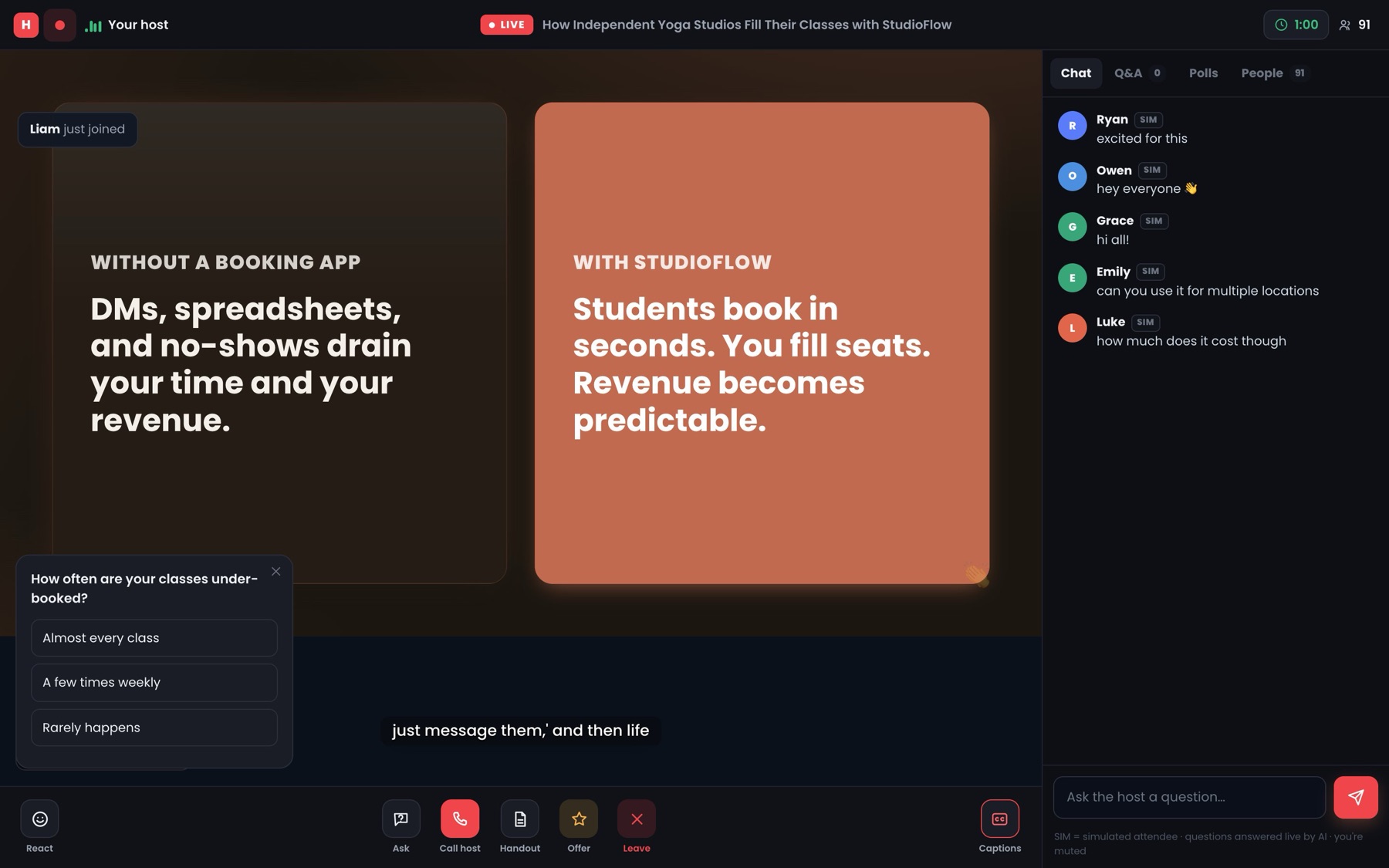
app.everpitch.co · live room
A real EverPitch live room: a slide on stage, a poll, captions and chat, with simulated attendees labelled SIM
LIVEA real EverPitch roomSIM = disclosed audience
Get the Bundle
✓30-day guarantee✓Instant access✓No yearly renewal
8,000credits every month
24webinar kits, ready to fill
4upgrades, all included
87languages it speaks
Everything switched on

Nothing left to add later.

📈 8,000 credits a month🎬 10 DFY webinars🧰 24 kits🏷️ Client license🗣️ Answers questions out loud
From Team Todd

We run webinars for our launches.
We know what it takes to get one right.

At Team Todd, we run webinars for all our launch offers. We've created and delivered a lot of them, and we know the work involved goes far beyond pressing "Go live".

A good webinar is eight jobs stacked on top of each other. Each one takes its own skill, and most people quietly give up somewhere between the script and the slides.

You shouldn't have to master every job to have a webinar.
Pip holding up a stack of finished slides
  1. Job 1

    Plan the pitch

    Decide the story, the order and where the offer lands.

  2. Job 2

    Write the script

    Draft, read it aloud, notice it drags, rewrite it.

  3. Job 3

    Build the slides

    Dozens of them, each one designed and on brand.

  4. Job 4

    Prepare demos

    Record, trim and cue them at the right moment.

  5. Job 5

    Rehearse

    Run it until the timing and transitions feel natural.

  6. Job 6

    Run the session

    Show up on time, present, watch the chat and make the offer.

  7. Job 7

    Handle Q&A

    Answer clearly, live, without losing the room.

  8. Job 8

    Prepare the replay

    Edit, upload and send it to everyone who missed it.

That's why EverPitch matters. Your knowledge and your offer, turned into a complete webinar you can review, customize and share— without becoming a scriptwriter, a slide designer, a voice artist and a presenter first, and the Bundle hands you the rest done for you.

The problem

Your best pitch only works when you're in the room.

Webinars sell because people can ask "will this work for me?" and hear the answer. That only happens while you're live. The moment you stop, the room goes quiet, and the replay can't reply.

You only answer when you're there.
Pip, the EverPitch mascot, sitting alone among empty chairs in front of a paused replay, surrounded by unanswered questionsis this still live? no replyhello? anyone? leftNobody's home.
  1. 1Write

    AI writers

    Draft a script quickly.
    Don't design it, voice it or present it.
  2. 2Present

    Webinar platforms

    Host the room.
    You still show up every time, or play a recording that can't reply.
  3. ?3Answer

    Nobody.

    When you're not live, nothing answers the person who's about to buy.

  4. 4Reach

    Streaming tools

    Put you on YouTube.
    Only while you're there to stream, and the chat goes unanswered.

More tools, more subscriptions, and still nobody there when the buyer has a question.

What if one tool did all of it, and answered for you?

Introducing the EverPitch Bundle

Write it once.
It answers back.

EverPitch writes, designs and voices your webinar, then runs it every day. Everyone in a session shares one clock, and the host answers the chat out loud, using only what's in your webinar. The Bundle adds 10 finished webinars to start from, 24 ready-made kits and a client license.

Try the chat demo
1

The talk

Written, designed and voiced.

One continuous talk, written to be spoken. Slides from 73 layouts in your colors, a natural voice in 87 languages, and you on camera if you like.

2

The room

Live, on one shared clock.

Everyone sees the same moment. Late joiners land in sync. Polls, your offer and handouts appear on cue, and the same session can stream to YouTube.

3

The host

Answers out loud, by name.

Greets people, sorts the chat and answers from your webinar's content. Viewers can call the host by voice, or meet an avatar face to face at the end.

Why the name
Ever+Pitch=EverPitch

Your best pitch, given forever: every day, in every timezone, to everyone who registers.

It's evergreen, and it says so. The optional simulated audience is always disclosed.
  • Questions answered at the end, at a minute you pick, or right away
  • Greetings get a welcome. Comments don't interrupt.
  • Answers only from what's in your webinar
Before you pay for traffic

Stop sending paid clicks to a silent replay.

Every viewer arrives with a doubt: the price, the fit, whether it works for someone like them. An ad click costs the same whether it lands somewhere that clears that doubt or somewhere that can't.

Destination A

A recorded replay

Plays the same video for everyone. Questions go unanswered.

Questions answeredNone
Destination B

A live webinar

Great when you're there. Only runs when you can show up, in your timezone.

Questions answeredWhen you're live
Destination C

An EverPitch room

Runs every session, in each visitor's timezone, and answers out loud.

Questions answeredEvery session

EverPitch doesn't run your ads. It gives the people you pay for a room that talks back.

Try it

Type into the chat. See what the room does.

Pick a message a viewer might send. The room sorts every message first, so the talk only stops for what needs it.

A viewer types…
LIVEChat · How to fill your classes142 watching
Maria hi from Texas 👋
Host Welcome, Maria! Glad you're here.
Greeting

A quick welcome in the chat. The talk keeps going.

An illustration of how the room sorts the chat. In a real session, answers come only from your own webinar.

How it works

Up and running in three steps.

Pip typing a webinar prompt on a laptop
STEP1

Describe it, or pick a kit.

Type what it's about, attach a PDF, upload a recording, or start from one of 24 ready-made kits.

Pip holding up a stack of finished slides while the voice plays
STEP2

Review it.

The talk, slides and voice come back. Change any slide by asking, and add on-camera clips of you from one photo.

Pip announcing the webinar through a megaphone, with a link, a calendar and an email
STEP3

Share it everywhere.

Pick a registration page and share the link, or embed the join button on your site.

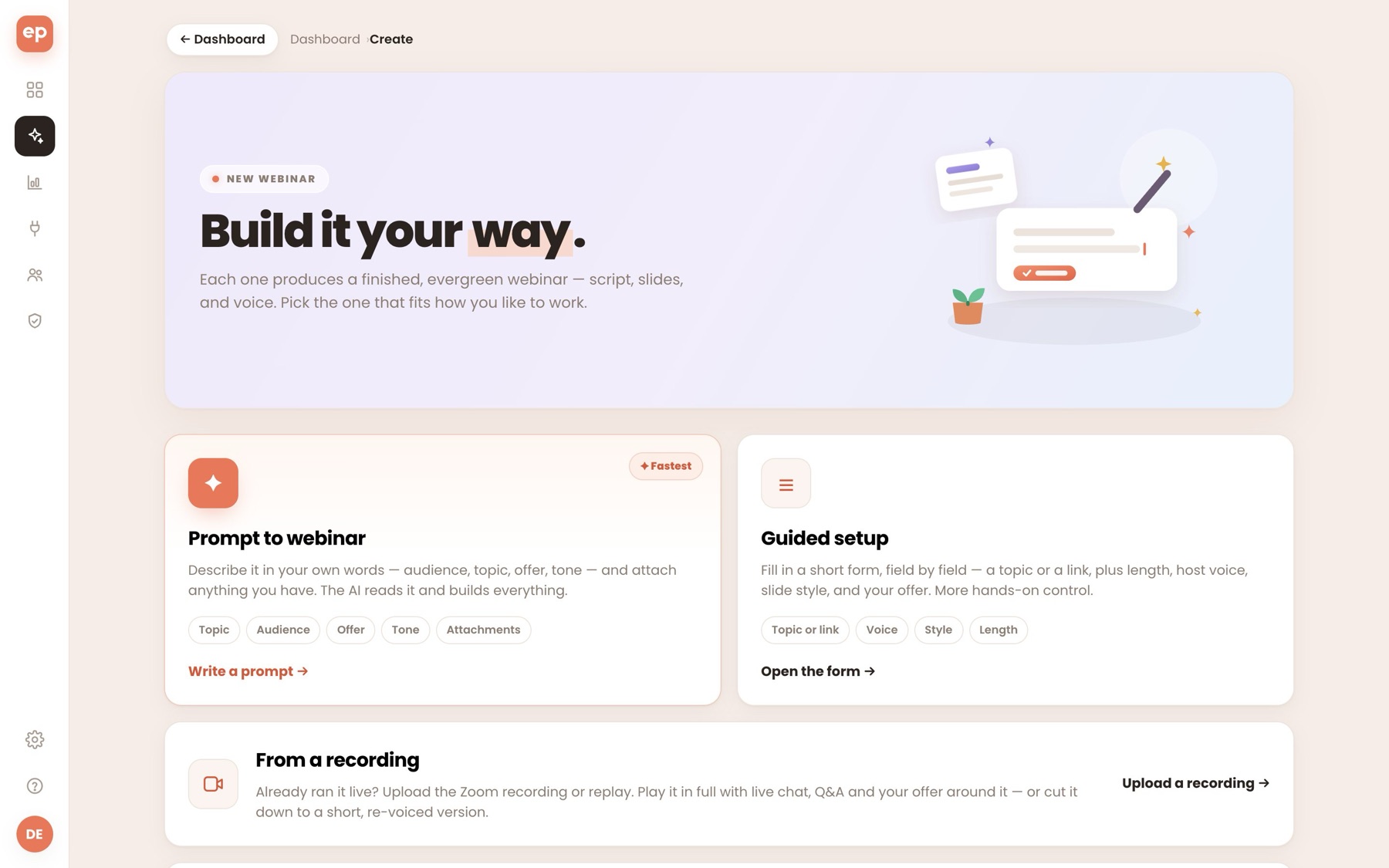
The Create page, exactly as you'll see it.

app.everpitch.co/create
The EverPitch Create page with prompt, guided setup, recording and done-for-you options
Slides and voice, built in

One prompt in. A finished webinar out.

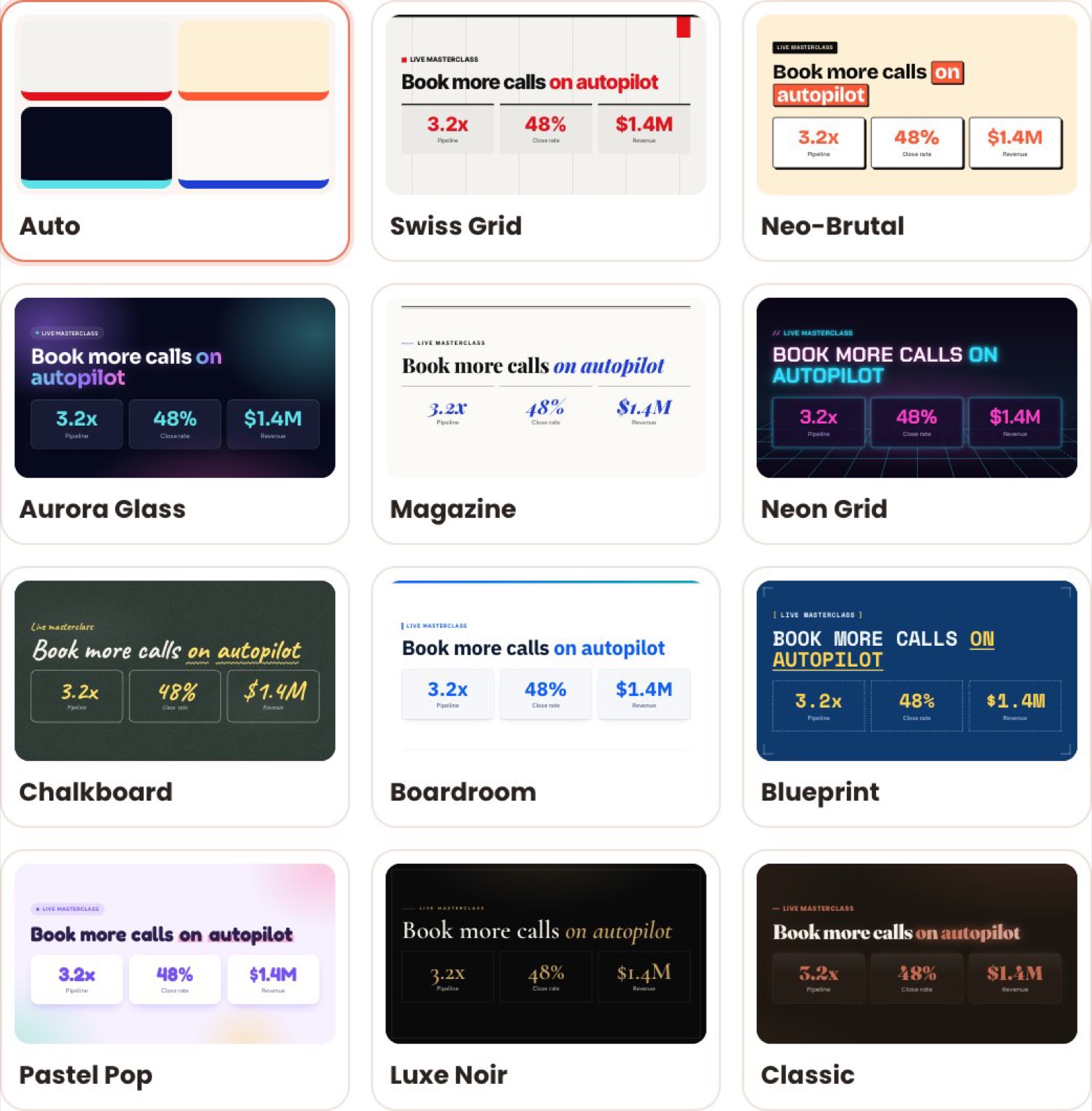
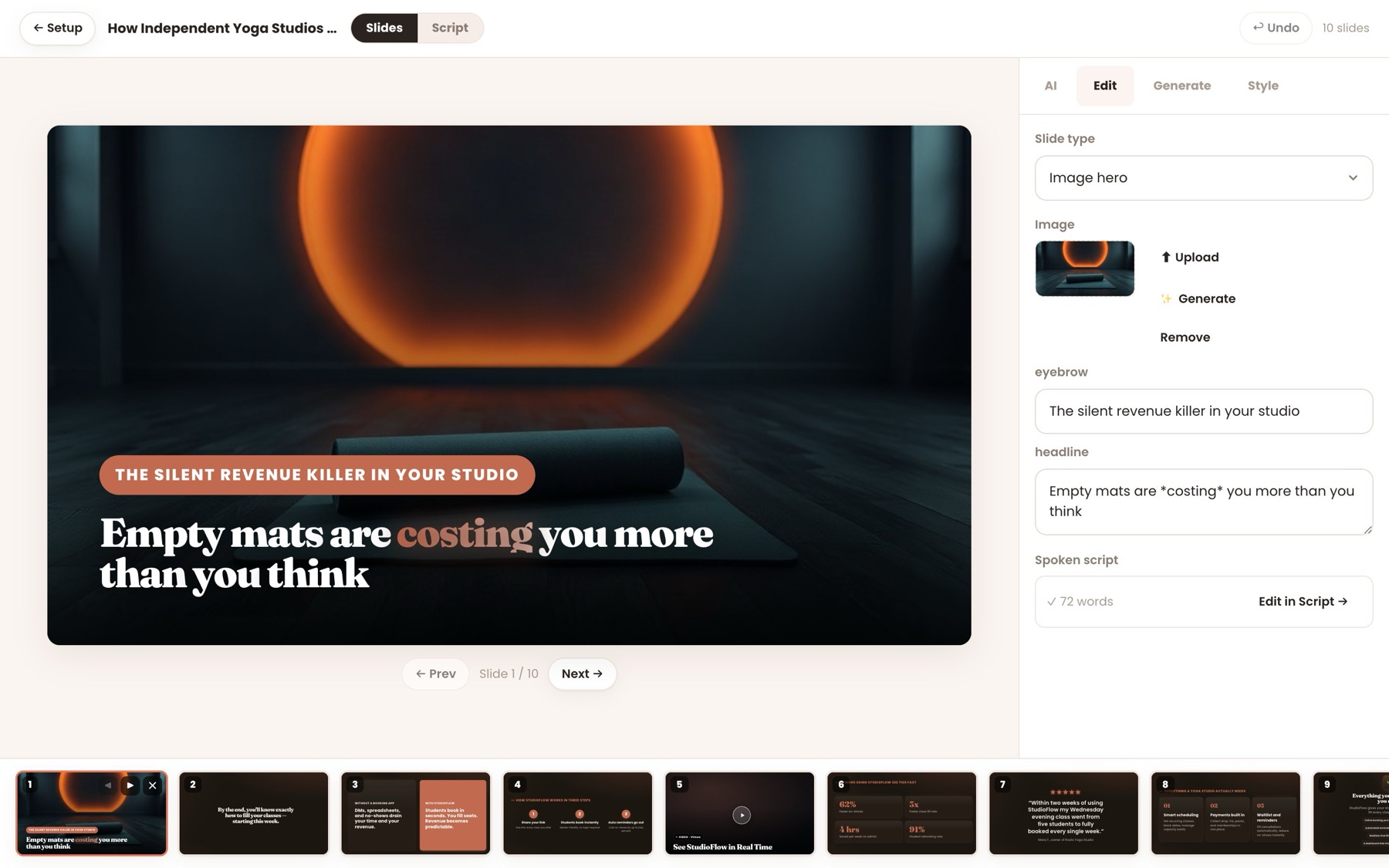
Every point gets the layout it needs, in one of 11 styles, in your brand color. These are real previews from the app, not mock-ups.

app.everpitch.co · Slide Studio
The EverPitch Slide Studio editing a generated slide, with the deck along the bottom

Four products, one checkout.

Commercial, DFY Webinars, Kit Vault and Agency, switched on from your first login.

Get the Bundle
✓Instant access✓30-day guarantee
What the Bundle adds

Four products, already switched on.

EverPitch turns any topic, document, link or recording into a webinar you review and customize, then presents it daily and answers questions out loud. The Bundle adds more credits, done-for-you webinars, ready-made kits and client work, all on from day one.

More credits

More webinars every month
  • 8,000 credits a month instead of 3,000, about 200 finished minutes
  • Enough for about 13 fifteen-minute webinars a month
  • Credits refresh every month

Kit Vault

Skip the blank page
  • 24 ready-made webinar kits for coaching, courses, SaaS, agencies and local services
  • Each sets the structure, length and style for you
  • Fill in the clearly marked blanks with your details, then build

Agency

Work for clients
  • A client license: make, run and charge for webinars for clients
  • No "Powered by EverPitch" on registration, live room or replay pages
  • Use your client's logo, name and color on webinars you build for them

DFY Webinars

Start from finished
  • 10 finished webinars, about 15 minutes each, designed and voiced
  • Each comes with its registration page, emails, poll and offer card
  • Neutral, so your offer fits. Your own copy to rebrand, and copying uses no credits
On its own

EverPitchOne-time payment

Credits every month
3,000
Finished minutes, about
75
Done-for-you webinars
Not included
Ready-made webinar kits
Not included
Your own logo, name and color
Included
Client license
Not included
Remove "Powered by EverPitch"
Not included
Everything switched on

The BundleOne-time payment

Credits every month
8,000
Finished minutes, about
200
Done-for-you webinars
10
Ready-made webinar kits
24
Your own logo, name and color
Included
Client license
Included
Remove "Powered by EverPitch"
Included
Four show-stoppers

Four things you didn't expect a webinar tool to do.

All four are in EverPitch from day one. Here's what goes in, and what comes out.

01

An old Zoom call becomes an evergreen webinar.

Keep the full video with a live room around it, or cut a tight short version.

Slides are read from the video, so names and prices come out right. Recordings up to 2 GB.

What goes in
MP4launch-webinar-recording.mp4
71 min
→
What comes out
Live room with chat, poll, offer and Q&A
02

One webinar, in every language you sell in.

Translated and re-voiced copies, linked together.

Each visitor gets their own language automatically, and analytics add every version together.

What goes in
English
Your finished webinar
→
What comes out
EnglishEspañolDeutschFrançais日本語Português
Each visitor sees their own
03

A host who answers by name, out loud.

At the end, at a minute you pick, or right away.

Greetings get a welcome, comments don't interrupt, and every question gets a spoken answer from your webinar's own content.

What goes in
Dev: can I use this with Shopify?
→
What comes out
"Great question, Dev…"
Spoken in the webinar's voice
04

Your demo, dropped in at the right moment.

Paste a link. EverPitch finds where it belongs.

The demo plays full-screen with a spoken lead-in, and the talk picks up after. It works on new and finished webinars.

What goes in
youtu.be/your-demo
→
What comes out
Slide 5 · the problem
Slide 6 · how it works
Your demo, with a lead-in
Slide 7 · results
In the Bundle

And because DFY Webinars is included: start from 10 finished, voiced webinars. Copy one into your account, add your logo and offer, and go.

The pages come with it

From sign-up to sale, in one place.

Every webinar gets the pages that fill it, written for its topic and editable word by word. Payments go to your own account. Leads go to your own list. With Agency included, none of them say "Powered by EverPitch".

  • 31 registration templates, or import the page you have
  • A replay sales page, from 20 templates
  • A join button for any website, in 10 styles
  • Times in each visitor's timezone, plus reminders and calendar invites
everpitch.co/w/your-webinar
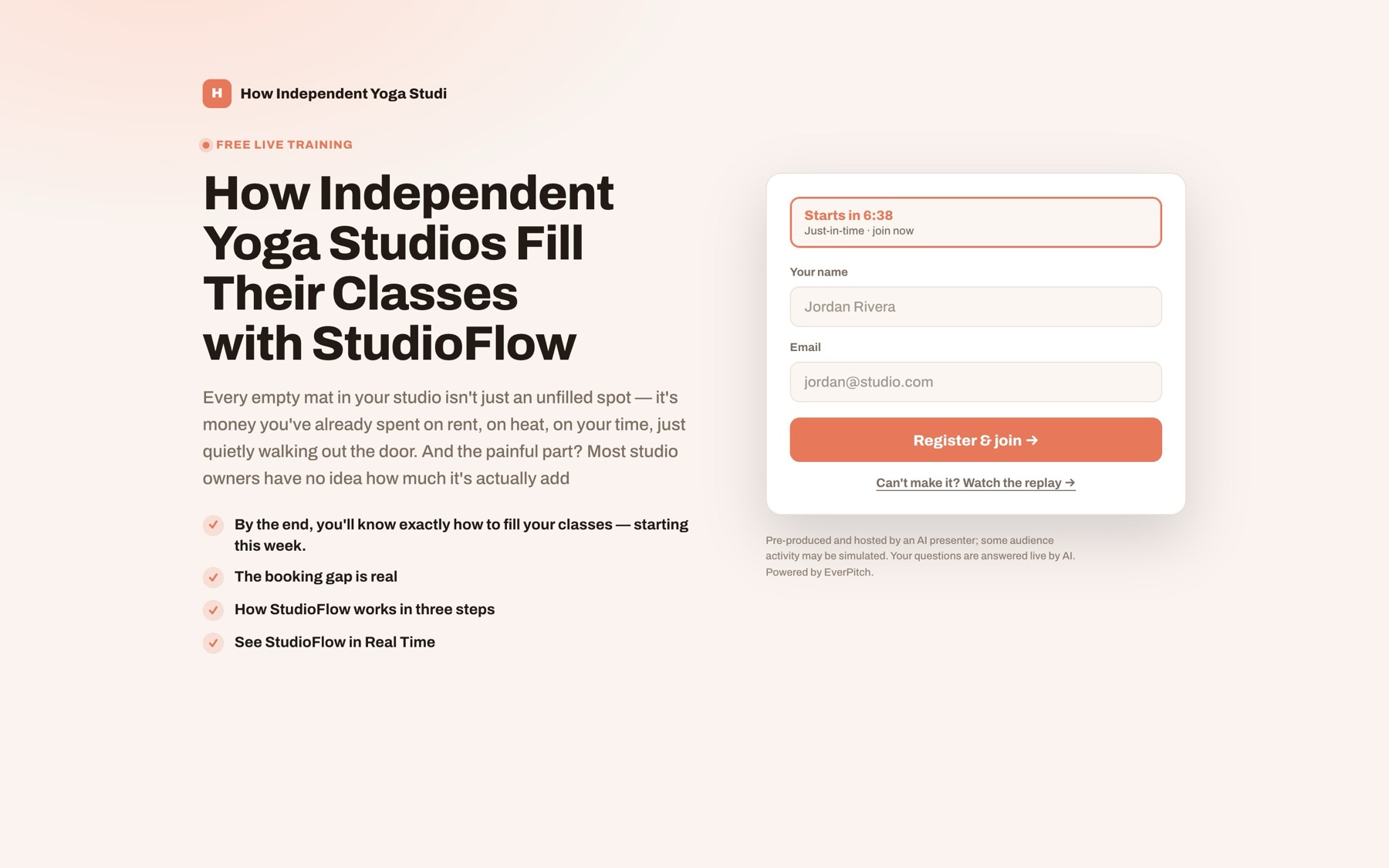
An EverPitch registration page with a just-in-time countdown and a sign-up form
  1. Registration

    A page from 31 templates

  2. Reminders

    Emails and calendar invites

  3. The live room

    One clock, Q&A out loud

  4. Your offer

    On screen at the right moment

  5. Checkout

    Your Stripe, PayPal, Lemon Squeezy or Razorpay

  6. Your list

    With analytics on every step

Sends registrants toMailchimpActiveCampaignKitGoHighLevelGetResponseBrevoAWeberZapier · Make · n8n

Your idea. Your expertise. A complete webinar in minutes.

Script, slides, voice, pages, reminders, the room, the offer, your checkout, done-for-you webinars and kits, all in one.

Put my webinars on autopilot
✓Instant access✓30-day guarantee
Live vs the Bundle

The same week. Two ways.

Running it live yourself
With the Bundle
MON
Block Thursday evening. Start the slides.
Pick a kit, fill in the blanks. The talk, slides and voice come back.
TUE
Write the script. Rehearse. Rewrite.
Tweak two slides. Or start from a done-for-you webinar instead.
WED
Email your list. Hope people turn up.
Pick a registration page. Reminders and calendar invites go out on their own.
THU
Present at 7pm. Half your list is asleep in another timezone.
Sessions run all day in each viewer's timezone.
FRI
Send the replay. Nobody answers its questions.
See who stayed, what they asked and who clicked the offer. Export the MP4 for ads.

Your results depend on your offer and your traffic. EverPitch makes sure nobody's question goes unanswered.

Who it's for

Pick the one that sounds like you.

Right now

You explain your method on every discovery call, one person at a time.

With the Bundle
  • A webinar explains it every day and books the calls that fit
  • Or start from a finished done-for-you webinar and add your offer
You'd ask it
A 15-minute webinar on how my coaching works, ending with a free strategy call.
What you get every month

A month of webinars, already paid for.

The Bundle gives you 8,000 credits every month. A finished minute of webinar costs 40, so that's about 200 minutes. Here are two months you could make with them.

Month A

A webinar a week, in two languages

Four 15-minute webinars
2,400
The same four in Spanish
2,400
A 20-minute webinar from a Vault kit
800
20 extra AI slide images
300
5,900 of 8,000FITS
Month B

Three clients and your own launch

Two 20-minute client webinars
1,600
A 30-minute client webinar
1,200
A 15-minute webinar from a Vault kit
600
Your 30-minute flagship webinar
1,200
The flagship in German
1,200
A done-for-you webinar, rebranded
0
5,800 of 8,000FITS
✓Questions answered out loud: free, up to 20 per session✓Built webinars keep running when credits run out✓Copying done-for-you webinars uses no credits

Four products, one payment.

8,000 credits every month, plus DFY Webinars, Kit Vault and Agency. Pay once.

See the Bundle
✓One-time payment✓30-day guarantee
Bonuses

Three bonuses, packed with your order.

Made for EverPitch, so your first webinar goes live faster. They're waiting on your thank-you page the moment you check out.

BONUS 1
7 days

The First 7 Days Playbook

One small job a day, from your first login to a live, promoted webinar.

DAY 1Your first prompt
DAY 4Pages, schedule and emails
DAY 7Read the numbers, change one thing
BONUS 2
100 hooks

The Webinar Title & Hook Bank

Fill-in-the-blank webinar titles and opening lines for 10 kinds of business.

COACHHow [type of client] gets [result] without [pain]
SAASThe [number]-minute fix for [problem] in [tool]
BONUS 3
7 emails

The After-Webinar Email Pack

Ready-to-edit follow-ups for people who stayed, left early, missed it, or still have a question.

NO-SHOW"Here's the replay, {{name}}"
LEFT EARLY"You missed the best part"
The Bundle

Everything on this page.
One payment.

EverPitch Commercial, DFY Webinars, Kit Vault and Agency, plus the three bonuses.

Commercial + DFY + Kit Vault + Agency

Bundle

$197one time

Bought one at a time, the same four cost $228.

  • EverPitch: every core feature, with commercial rights
  • 8,000 credits a month (about 200 finished minutes)
  • Kit Vault: 24 ready-made webinar kits
  • Agency: a client license, and your pages without “Powered by EverPitch”
  • DFY Webinars: 10 finished, voiced webinars to rebrand
  • The three bonuses
Get the Bundle
✓Instant access. Login by email.✓30-day money-back guarantee✓One-time payment✓Secure checkout via JVZoo

One payment, no renewal. Ultra is not included and is sold separately.

Just want EverPitch? It's a one-time payment on its own, and you can add upgrades later. Get EverPitch on its own

Pip holding a shield with a check mark
30days
Money-back guarantee

Use all of it for 30 days. Then decide.

Build a webinar, try a done-for-you one, open a kit and watch the room work. If the Bundle isn't right for you, email support within 30 days of buying and you'll get your money back through JVZoo.

No reason neededTell us why if you like. You don't have to.
A full 30 daysTo try everything in the Bundle.
Back the way you paidRefunded through JVZoo.
Questions

Questions people ask.

Didn't see yours? Email support@everpitch.co.

The bundles
What's in the Bundle?

EverPitch Commercial, DFY Webinars, Kit Vault and Agency, with 8,000 credits a month, plus the three bonuses.

Is it a one-time payment?

Yes. You pay $197 once. There's no yearly renewal.

Is Ultra included?

No. Ultra (streaming, MP4 export, host on camera and voice calls) is sold separately. Done-For-You webinars are already in the Bundle.

Can I just get EverPitch on its own?

Yes. EverPitch on its own is a one-time payment, and you can add upgrades after checkout.

Getting started
Do I need to be technical?

No. You describe your webinar in plain words, pick a kit, or upload something you already have. There's nothing to install.

How do I get my login?

Right after checkout you'll get an email titled "Set up your EverPitch account". Click the link, choose a password, and you're in. Everything in the Bundle is already switched on.

Do I have to appear on camera?

No. EverPitch writes, designs and voices the whole webinar. You never record yourself.

Credits
What are credits?

Credits pay for building webinars: 40 per finished minute, so a 15-minute webinar uses about 600. Extra languages and extra AI images use a few more.

What if I run out?

Webinars you've already built keep running. New builds wait until your credits refresh next month.

Do questions during a session cost credits?

No. Answering questions out loud is included, up to 20 answers per session.

Your business
Is it really live?

The talk is prepared ahead of time and played on a shared clock, so everyone in a session sees the same moment. Questions are answered on the spot, from your content. The simulated audience is optional, and when it's on, your registration page says so.

What if it gets a fact wrong?

Answers come only from what's in your webinar, and you can read and edit every line of the script before you go live. Spam and abuse in the chat are screened before anything is read out.

Can I use it for clients?

Yes. Every account can put its own logo, name and color on its webinars. Agency, included in the Bundle, adds the license to make and run webinars for clients, and removes “Powered by EverPitch” from the pages.

Can I clone a speaker's voice?

Only with their consent. When you clone a voice from a recording, you confirm the speaker has agreed, and answers are then spoken in that voice.

Who helps me if I'm stuck?

Email support@everpitch.co with your JVZoo receipt number.

Your call

You'll pitch again tomorrow.
With everything switched on?

Pip relaxing in a beach chair while a laptop runs the webinar live
Path one

Start with the basics

Get EverPitch Commercial on its own and decide on each upgrade later, one page at a time. See EverPitch on its own

OR
Path two

Switch everything on

Commercial plus 10 done-for-you webinars, 24 kits, client work and 8,000 credits a month. One payment, and 30 days to decide.

Get the Bundle
✓No yearly renewal✓30-day guarantee✓Instant access

P.S. Not sure you'll use all of it? You have 30 days to try everything in the Bundle before you decide.

P.P.S. It's one payment of $197. No yearly renewal.

P.P.P.S. Working with clients? Agency is included, giving you the license to make and run webinars for clients, without “Powered by EverPitch”.