





Upgrade 4 of 4 · Ultra

A host on camera.
A voice that talks back.

Ultra unlocks EverPitch's premium AI: the host on camera, live voice calls with viewers, a face-to-face avatar Q&A at the end, and answers in a real speaker's own voice, plus streaming. You switch each one on per webinar.

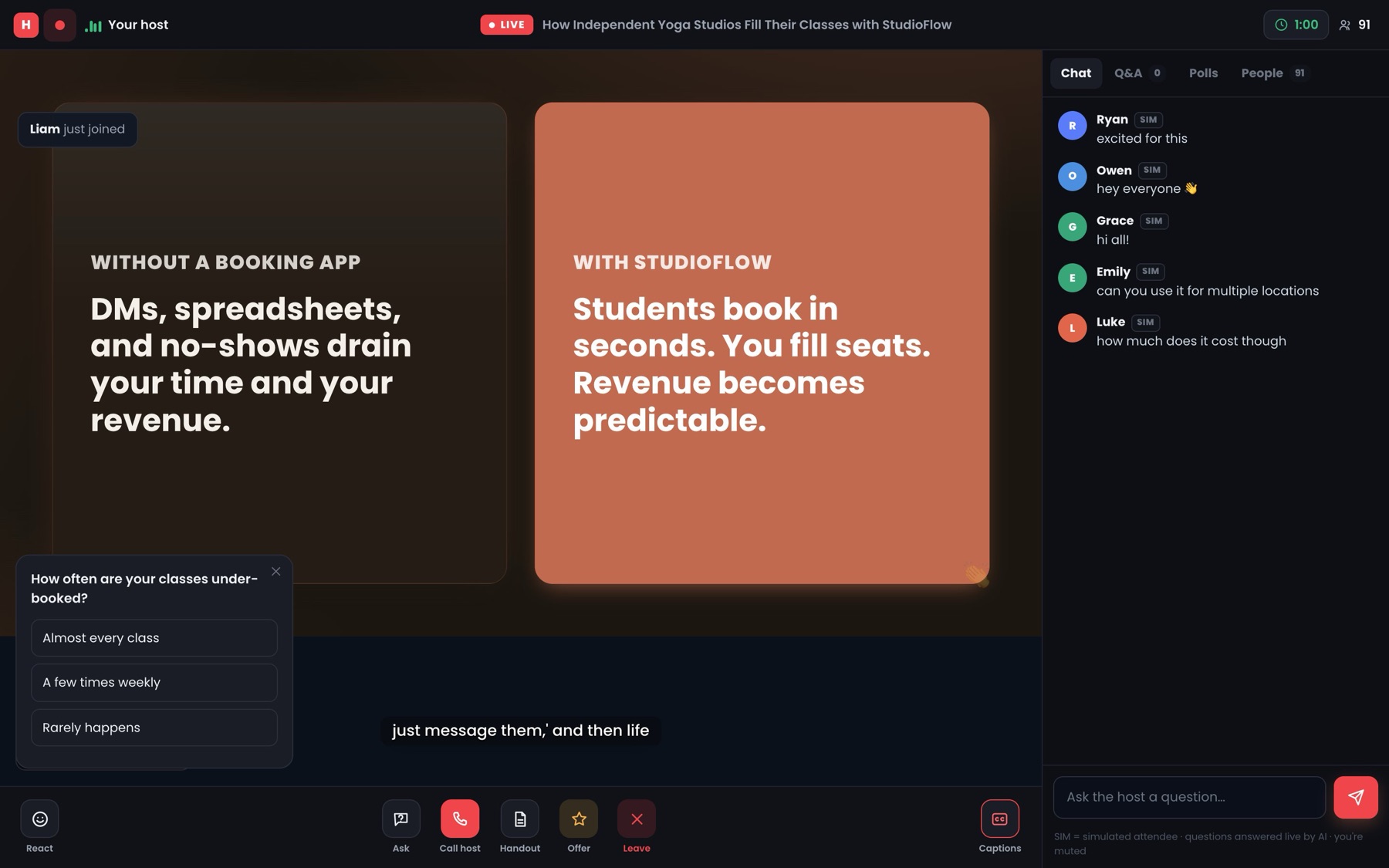
app.everpitch.co · live room
The EverPitch live room: slides, the chat and a Call host button in the bottom bar
LIVEWith Ultra, viewers press Call host and talk to the hostBottom bar · Call host
Add Ultra to my account
✓Cancel anytime in JVZoo✓One click, same checkout✓30-day guarantee
1photo is all a host clip needs
150credits per host-on-camera clip
4premium AI features, on per webinar
$97a year, cancel anytime
The problem

A voice with no face is easy to leave.

Narrated slides carry a webinar a long way. But some viewers want to see who's talking, and some want to ask out loud. When they can't, and when the webinar simply ends, they leave with their question still in their head.

Viewers want someone to see, and someone to ask.
Pip, the EverPitch mascot, sitting alone in a row of empty chairs facing a paused screen"is anyone there?" viewerWebinar ended room closedNo one to talk to
  1. 1Face

    No face

    Your slides and voice carry the talk.
    With no one on screen, it can feel faceless.
  2. 2Talk

    No one to call

    Typed questions get spoken answers.
    Viewers can't just ask out loud, like on a call.
  3. ?3The end

    Then it just ends.

    The last slide plays, the room closes, and a viewer with one more question has no one left to ask.

  4. 4Voice

    Someone else's voice

    A recording becomes a webinar.
    Its answers come in an AI voice, not the speaker's.

No face, no call, no after-show, and a voice that changes: four gaps between a webinar and a real host.

What if your webinar had a host people could see and talk to?

Introducing EverPitch Ultra

The premium AI.
On per webinar.

Ultra gives your webinar a host people can see, call and talk to face to face, in the voice that belongs to it. Switch on what each webinar needs, and leave the rest off.

Add Ultra
1

On camera

From one photo.

Short talking-head clips at the key slides, full-screen or picture-in-picture. Use your photo, touched up if you like, or a stock face.

2

On the line

Viewers call the host.

Viewers press Call host and talk by voice during the webinar. The host answers in the voice that narrated your deck, from your content only.

3

Face to face

When the webinar ends.

Instead of a closed room, viewers can start a video Q&A with an AI avatar that knows your deck.

Straight answer · why is Ultra yearly?

These features run on live video and voice AI, which cost money every time a viewer uses them. A yearly price keeps them running.

Cancel anytime in JVZoo, and your webinars keep working without them.
  • Each feature is switched on per webinar
  • Host clips and avatar Q&As use 150 credits each, from your plan
  • A speaker's voice is cloned only with their consent
See it

Where Ultra shows up in a webinar.

Ultra doesn't change how you make a webinar. It adds moments to the one you already have: a face at the slides that matter, a call button the whole way through, and a conversation at the end.

  • Pick which slides get a host clip
  • Call host sits in the live room's bottom bar
  • The avatar Q&A is offered when the webinar ends
One webinar, start to finish
  1. 0:00Slides and voiceYour webinar plays as it always does.
  2. Key slidesHost on cameraA short clip of you, full-screen or picture-in-picture.ULTRA
  3. Any timeCall hostA viewer presses the button and asks out loud.ULTRA
  4. The endAvatar Q&AViewers who stay can talk face to face.ULTRA
Illustration. Where clips go depends on your deck.
How it works

A host people can talk to, in three steps.

Pip working on a laptop
STEP1

Add a face.

Upload one photo of yourself, with an optional pro-headshot touch-up, or pick a stock face.

Pip holding a clipboard with four ticked boxes
STEP2

Switch on what you want.

Turn on host clips, Call host and the avatar Q&A for each webinar, and pick the slides that get a clip.

Pip jumping with joy as it presses a big LIVE button
STEP3

Let it run.

Every time the webinar plays, viewers see the host, can call in by voice and can talk face to face at the end.

Before and after

What changes with Ultra.

What you have now

EverPitch

Narrated slides and a live room
Included
Typed questions answered out loud
Included
Host on camera
Not included
Viewers call the host by voice
Not included
Face-to-face avatar Q&A at the end
Not included
Answers in the speaker's own voice
Not included
Streaming
Not included
With Ultra

EverPitch Ultra

Narrated slides and a live room
Included
Typed questions answered out loud
Included
Host on camera
150 credits a clip
Viewers call the host by voice
Included
Face-to-face avatar Q&A at the end
Included
Answers in the speaker's own voice
With consent
Streaming
Included

Ultra renews every 12 months at the same price. Cancel anytime in JVZoo, and your webinars keep working without these features.

Give your webinar a host people can talk to.

Host on camera, Call host, avatar Q&A, your speaker's own voice and streaming, for $97 a year.

Add Ultra
✓Cancel anytime in JVZoo✓30-day guarantee
What goes in, what comes out

Four features. Here's what each one does.

01

One photo becomes a host on camera.

Short talking-head clips at the key slides, full-screen or picture-in-picture.

Upload a photo of yourself, with an optional pro-headshot touch-up, or pick a stock face. Each clip uses 150 credits from your plan.

What goes in
JPGyour-photo.jpg
1 photo
Or a stock face
→
What comes out
The host on camera at the key slides
02

A viewer asks out loud. The host answers out loud.

Call host, during the webinar.

Viewers press Call host and talk by voice. The host answers in the voice that narrated your deck, using only your content, and the room sees who's on air.

What goes in
"Does this work for a small clinic?"
A viewer's question, by voice
→
What comes out
A spoken answer from your content
In the webinar's own voice
03

The end of the webinar becomes a face-to-face Q&A.

Offered once the webinar ends.

Instead of a closed room, viewers can start a live video conversation with an AI avatar that knows your deck, right where they'd otherwise leave.

What goes in
ENDThe last slide
webinar ends
→
What comes out
An avatar Q&A, face to face
04

A recording keeps its speaker's voice.

For webinars made from a recording.

Questions are answered in the original speaker's cloned voice. The speaker has to agree, and EverPitch asks you to confirm that with a consent box before it clones anything.

What goes in
MP4founder-talk.mp4
a recording
→
What comes out
Answers in the speaker's own voice
Not a stand-in AI voice
Add Ultra

The premium AI.
$97 a year.

Added to the account you just bought, with the same checkout. Renews every 12 months, and you can cancel anytime in JVZoo.

What's in the box
Host on cameraClips from one photo or a stock face, full-screen or picture-in-picture
Pro-headshot touch-upOptional, for the photo you upload
Call the hostViewers talk to the host by voice during the webinar
Avatar Q&AFace to face, when the webinar ends
The speaker's own voiceAnswers in a cloned voice, with the speaker's consent
StreamingStream your webinars, included with Ultra
On per webinarUse each feature where it matters
Ultra · yearly
$97a year

Host clips and avatar Q&As use 150 credits each from your plan. Renews yearly; cancel anytime in JVZoo.

Yes, add Ultra
One click, same checkout30-day money-back guaranteeCancel anytime in JVZooSwitched on per webinar

No thanks, take me to my account

Pip holding a shield with a check mark
30days
Money-back guarantee

Try Ultra on a real webinar for 30 days.

Add your face, switch on Call host and take a call. If Ultra isn't right for you, email support within 30 days and you'll get your money back through JVZoo.

No reason neededTell us why if you like.
A full 30 daysTo try it with real viewers.
Back the way you paidRefunded through JVZoo.
Questions

Questions about Ultra.

Didn't see yours? Email support@everpitch.co.

Billing
Is Ultra a one-time payment?

No. Ultra is $97 a year and renews every 12 months at the same price. These features run on live video and voice AI, which cost money every time a viewer uses them.

How do I cancel?

Anytime, from your purchase in JVZoo. Ultra stays on until the end of the year you've paid for, and the rest of your EverPitch account doesn't change.

What happens to my webinars if I cancel?

They keep working. Host clips you've already made keep playing. Call host, the avatar Q&A, new clips and speaker voice cloning stop.

The features
Do host-on-camera clips use credits?

Yes. Each clip uses 150 credits from your plan's monthly credits. If you'll use a lot of clips, Credit Boost (8,000 total credits a month) gives you more room.

Does the face-to-face avatar Q&A use credits?

Yes. Each conversation uses 150 credits from your plan and lasts up to 10 minutes. To keep costs predictable, each viewer can start two per session, up to three can run at once, and your account can have up to 100 in any 30 days.

Do I have to be on camera?

No. One photo is enough, with an optional pro-headshot touch-up. Or pick a stock face and never use your own.

What voice does the host use on a call?

The voice that narrated your deck, so the call sounds like the webinar. The host answers only from your own content.

Can I clone anyone's voice?

Only with their consent. Speaker voice cloning is for webinars made from a recording, and EverPitch asks you to confirm in a consent box that the speaker agreed before it clones anything.

Do I have to use every feature on every webinar?

No. Each feature is switched on per webinar, so you can use host clips on one, Call host on another, or all four together.

Your call

Keep it voice-only,
or give it a host?

Pip holding a small calendar with a renewal arrow on it
Path one

Voice-only

Keep narrated slides and typed questions answered out loud. Your webinars work as they are.

No thanks, take me to my account

OR
Path two

A host people can see and talk to

Host on camera, Call host, an avatar Q&A, your speaker's own voice and streaming. $97 a year.

Add Ultra
✓Cancel anytime in JVZoo✓30-day guarantee✓One click, same checkout

P.S. There's nothing to film. One photo, or a stock face, is enough for host-on-camera clips.

P.P.S. Ultra renews yearly and you can cancel anytime in JVZoo. Clips you've already made keep playing.