



Upgrade 2 of 4 · The Webinar Vault

24 webinar kits,
ready to build.

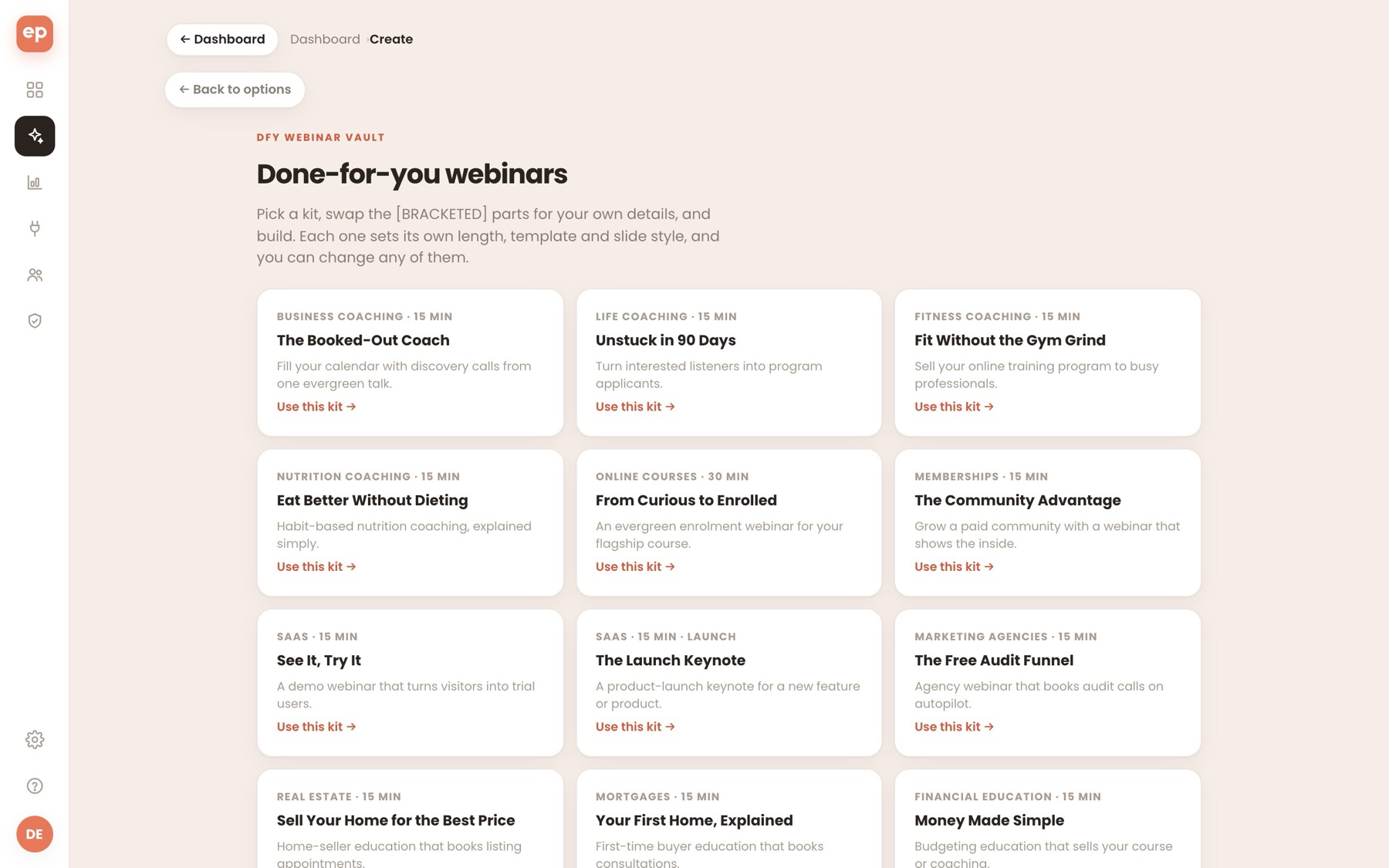
Each kit is a finished brief for a proven kind of webinar: who it's for, the promise, the beats of the talk, the tone and the call to action. Fill in your details, click build, and EverPitch makes the talk, slides and voice.

app.everpitch.co/create · Done-for-you webinars
The Webinar Vault inside EverPitch: a grid of ready-made webinar kits on the Create page
VAULTInside the app: Create → Done-for-you webinarsUse any kit, as often as you like
Add the Vault to my account
✓One payment, no renewal✓30-day guarantee✓One click, same checkout
24ready-made webinar kits
23markets covered
3product-launch kits
1payment, yours to keep
The problem

The hardest part is the first sentence.

EverPitch builds a whole webinar from one prompt. But the prompt decides how good it is: who it's for, what it promises, what order the talk goes in and what you ask for at the end. Staring at an empty box, most people write one line and hope.

A vague prompt makes a vague webinar.
Pip, the EverPitch mascot, at a laptop in front of an empty prompt boxwhere do I start? blank boxwhat's my offer? no ideaBlank page.
  1. 1Start

    The blank page

    You know your offer inside out.
    Turning it into a webinar brief is a different skill.
  2. 2Structure

    A weak shape

    Your content is good.
    In the wrong order, people drift off before the offer.
  3. 3Close

    Guessing the ask

    You have something to sell.
    The call to action ends up vague, so few people take it.

What if you started from a brief that's already written?

Introducing the Webinar Vault

Skip the blank page.
Start from a finished brief.

The Vault adds 24 webinar kits to your Create page. Each one is written for a market, with the structure that works on webinars and clear spots for your own details.

Add the Vault
1

The structure

The beats, in the order that sells.

Who it's for, the promise, the problem, your method, objections and the invitation, written out for the market.

2

The look

Length, template and style.

Each kit sets its length (15 or 30 minutes), the webinar template and a matching slide style. Change any of them.

3

Your details

Clearly marked blanks.

Spots like [YOUR NAME] show what to fill in. EverPitch won't build until every one is done.

See it

Pick a market. See its kit.

Eight of the 24 kits, as their cards appear in the app. The full brief opens in your account.

Your market…
BoardroomBusiness coaching
The Booked-Out Coach
Business coaching
Fill your calendar with discovery calls from one evergreen talk.
Length15 minTemplateStandardStyleBoardroom
Then you swap the [BRACKETED] parts for your detailsUse this kit →

Titles, hooks, lengths and styles are from the real kits. The slide above is a color sample of the style, not a page from the webinar.

What's in a kit

Everything the AI needs to write a strong talk.

The structure

The beats of the talk in the order that sells: the problem, the method, a story or demo, objections and the invitation.

The right length and look

Each kit sets its length (15 or 30 minutes), the webinar template and a matching slide style. Change any of them.

Your details, clearly marked

Spots like [YOUR NAME] and [YOUR LINK] show exactly what to fill in. EverPitch won't build until they're done.

Honest by default

Kits for health, money and insurance include the right cautions: no guaranteed results, no advice dressed up as a promise.

Launch kits included

Three kits follow the product-launch arc, for a new product, a SaaS feature or a book.

In your account for good

The Vault lives inside EverPitch, on the Create page. It's a one-time payment, and you can use any kit as often as you like.

The marketsBusiness coachingLife coachingFitness coachingNutrition coachingOnline coursesMembershipsSaaS demoSaaS launchMarketing agenciesReal estateMortgagesFinancial educationE-commerce launchE-commerce consultingClinics & dentistsHome servicesInsuranceB2B consultingFreelancersAuthorsWorkshops & eventsNonprofitsEducation & tutoringAffiliate marketing
How it works

From kit to webinar in three steps.

Pip pointing cheerfully at something next to it
STEP1

Pick a kit.

Open Create → Done-for-you webinars and choose the kit for your market. Its brief drops into the prompt.

Pip holding a clipboard with every box ticked
STEP2

Fill in your details.

Swap every [BRACKETED] part for your own name, offer, price and link. Change anything else you like.

Pip holding up a finished deck
STEP3

Build it.

EverPitch writes the talk, designs the slides and records the voice, at the kit's length and in its style.

Before and after

Your next prompt, with the Vault.

Starting from a blank prompt

You write the brief

Who it's for
You work it out
The promise
You work it out
The beats of the talk
You plan them
The call to action
You write it
Length, template and style
You choose
Starting from a kit

You fill in the blanks

Who it's for
Written in
The promise
Written in
The beats of the talk
Laid out
The call to action
Written, with your link
Length, template and style
Set for the market

Building from a kit costs the same credits as any build: 40 credits a finished minute. Browsing and picking kits is free.

Never start from a blank page again.

24 webinar kits on your Create page, for one payment of $47.

Add the Vault to my account
✓One payment, no renewal✓30-day guarantee
From kit to webinar

What goes in, what comes out.

Two of the kits, start to finish.

01

A coaching kit becomes a call-booking webinar.

The Booked-Out Coach · 15 min · Boardroom

You add your name and your booking link. EverPitch builds the talk, the slides and the voice, ending on your discovery call.

What goes in
The Booked-Out Coach
[YOUR NAME] [YOUR BOOKING LINK]
→
What comes out
✓A 15-minute talk
✓Slides in Boardroom style
✓The voice, in sync
✓Ends on your booking link

02

A launch kit becomes a product keynote.

The Launch Keynote · 15 min · Product launch · Luxe Noir

Add your product, your launch offer and when it ends. The kit uses the product-launch template, so the talk follows the launch arc: pain, proof, demo, offer, close.

What goes in
The Launch Keynote
[LAUNCH OFFER] [END DATE]
→
What comes out
✓A launch keynote
✓Slides in Luxe Noir
✓The voice, in sync
✓Ends on your offer
Your upgrade

The whole Vault.
One payment, yours to keep.

Added to the account you just bought. There's no renewal, and the kits stay on your Create page.

What's in the box
24 webinar kitsFinished briefs, ready to fill in
23 marketsCoaching, courses, SaaS, agencies, local services and more
The structure that sellsAudience, promise, beats, tone and call to action
Length, template and styleSet for each kit, all changeable
3 product-launch kitsA product, a SaaS feature or a book
Use them again and againFor each offer, client or market
Webinar Vault
$47one time

24 ready-made webinar kits, added to your account for good.

Yes, add the Vault
One click, same checkoutOne payment, no renewal30-day money-back guaranteeOn your Create page right away

No thanks, I'll write my own briefs

Pip holding a shield with a check mark
30days
Money-back guarantee

Try the kits for 30 days.

Open the Vault, pick a kit and build a webinar from it. If it isn't worth it to you, email support within 30 days and you'll get your money back through JVZoo.

No reason neededTell us why if you like.
You keep EverPitchYour account and webinars stay.
Back the way you paidRefunded through JVZoo.
Questions

Questions about the Vault.

Buying
Is the Vault a one-time payment?

Yes. It's $47 once. There's no renewal, and the kits stay in your account.

Where do I find the kits?

In EverPitch, on the Create page: Create → Done-for-you webinars. They appear as soon as your purchase goes through.

Which markets are covered?

Coaching (business, life, fitness, nutrition), online courses, memberships, SaaS demos and launches, agencies, real estate, mortgages, financial education, e-commerce, clinics, home services, insurance, B2B consulting, freelancers, authors, workshops, nonprofits, tutoring and affiliate marketing.

Using the kits
Can I edit a kit?

Yes. Picking a kit puts its brief in the prompt box, and you can change any of it before you build. After the build, edit the slides and script like any other webinar.

What are the [BRACKETED] parts?

The spots for your own details, like your name, offer, price and link. EverPitch won't build until you've replaced every one, so no webinar goes out with a blank in it.

Can I use the same kit more than once?

Yes. Use a kit as often as you like, for different offers, markets or clients.

Do the kits write the webinar for me?

The kit is the brief. EverPitch writes the talk, designs the slides and records the voice from it, the same way it does from your own prompt.

Credits
Do kits use credits?

Browsing and picking a kit is free. Building the webinar uses credits like any build: 40 credits a finished minute.

Your call

Your next webinar starts
with a blank page, or a brief?

Path one

Write every brief yourself

Work out the audience, the promise, the order of the talk and the ask, each time you make a webinar.

OR
Path two

Start from a kit

Pick the kit for your market, fill in your details and build. 24 of them, yours to keep.

Add the Vault to my account
✓One payment, no renewal✓30-day guarantee

P.S. The Vault is added to the account you just bought. The kits show up on your Create page right away.

P.P.S. It's one payment. Use any kit as often as you like, for every offer and client.