✓Your order went through. It's being added to your account now.
One last offer · Done-For-You

10 finished webinars.
Ready to launch.
Just add your offer.

Done-For-You copies 10 complete, voiced webinars into your account. Each one already has its slides, script, voice-over, registration page and emails. Put your brand and your offer on one, and it can go live today.

app.everpitch.co · Slide Studio
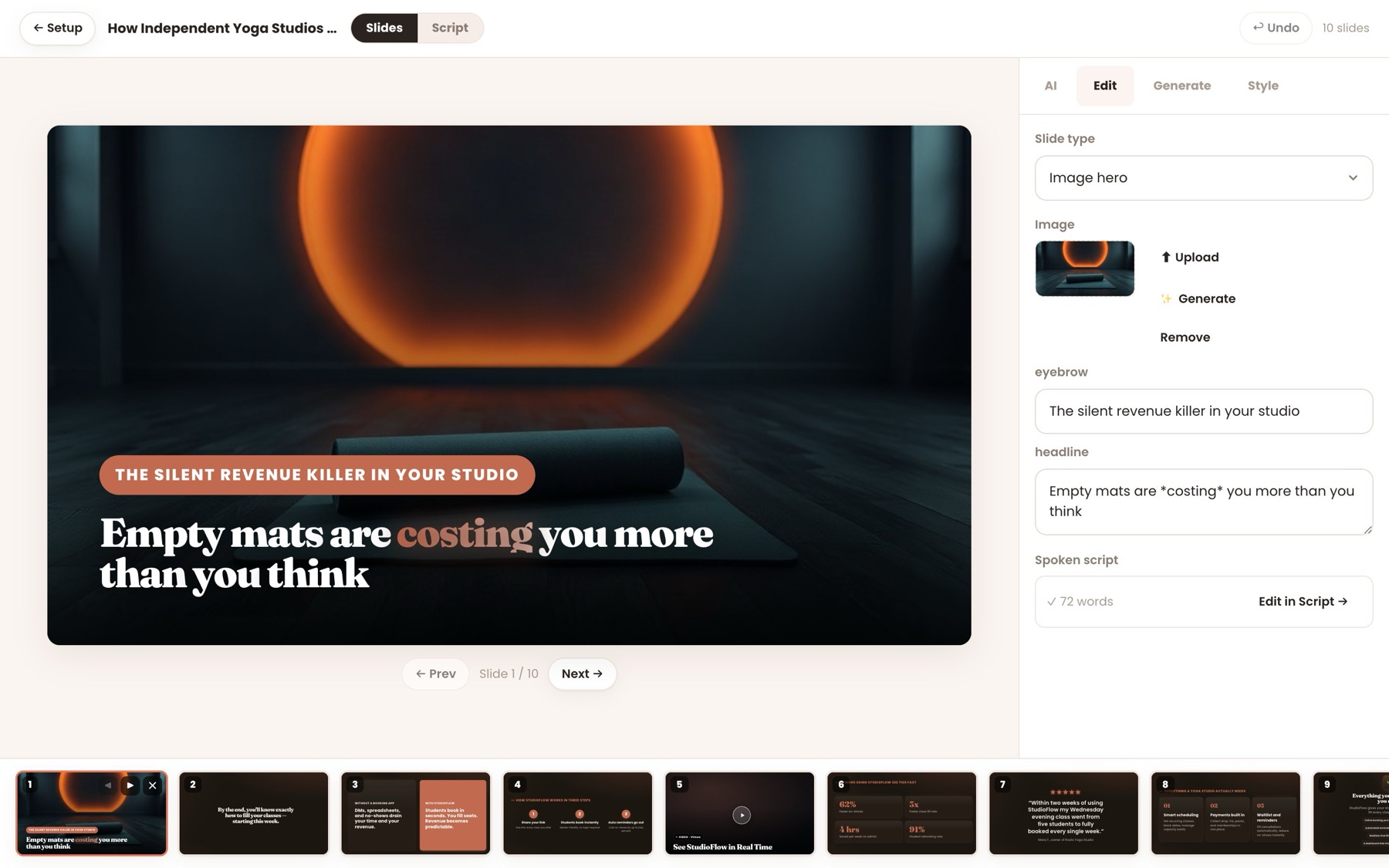
A finished EverPitch webinar open in the Slide Studio, with its deck along the bottom
READYEach one opens here, like a webinar you built yourself
Show me the 10 webinars
✓One click, same checkout✓One-time payment✓30-day guarantee
10finished, voiced webinars
15minutes each, about
7different slide styles
0credits to copy them in
The slow part

EverPitch builds fast. Knowing what to build is slower.

A webinar starts with decisions: which topic, which angle, what to promise, how to lead into the offer. Then you review every slide and line. That's the part that keeps a webinar on the to-do list.

Start from finished instead.
Pip, the EverPitch mascot, scratching its head over what to buildwhat topic sells? stuckrewrite the hook… againAlready done.
  1. 1Topic

    Pick an angle

    You know your market.
    Turning it into a 15-minute talk that leads to an offer takes thought.
  2. 2Brief

    Write the brief

    EverPitch builds from one sentence.
    A good brief still needs the beats, the tone and the call to action.
  3. 3Review

    Check it all

    Slides, script and voice arrive together.
    Then you read every slide, page and email before it goes out.
  4. ✓4Done-For-You

    Skip to launch.

    10 webinars where all three are done. You add your offer.

Introducing Done-For-You

Ten webinars, already built.
Yours to rebrand.

Done-For-You is a library of 10 finished webinars across popular markets. Add one to your account and you get your own copy: slides, voice-over, registration page and emails, ready for your logo and your offer.

Add the 10 webinars
1

Finished

Not a template or a brief.

Each webinar is fully built and voiced, the same as one you'd make yourself, start to finish.

2

Neutral

No names, brands or prices.

The talk points to "the offer on this page", so your offer fits without re-voicing anything.

3

Yours

An independent copy.

It arrives wearing your account's logo and color. Edit the script, voice or slides as much as you like.

What's in each webinar

Not a template. A finished webinar.

The Vault gives you briefs to build from. Done-For-You gives you the finished result. Here's what comes with every one of the 10.

Designed slides

A full deck in a matching style, with the charts, steps and comparisons already laid out.

Script and voice-over

The talk is written and voiced, ready to play. Change the voice or any line in Script view.

Registration page

A page with the headline, benefits and sign-up form written for that webinar.

Emails

A confirmation and follow-ups, written to match the talk.

Poll and offer card

A poll the host asks out loud and an offer card that appears at the right moment, ready for your link.

Yours to rebrand

Your logo, color and offer show on every page of that webinar. They're copies, so edit them freely.

The webinars

Ten finished webinars, ready to rebrand.

Each one is about 15 minutes, fully voiced, with its own registration page and emails. Host, brand and product are kept neutral, so it's yours once you add your offer.

  1. Coaching

    Your First 10 Coaching Clients

    A free strategy call
  2. Online courses

    Turn What You Know Into a Course

    Your course program
  3. Local marketing

    Why Local Businesses Lose Customers Online

    A free marketing audit
  4. AI for business

    AI for Small Business, Without the Hype

    A free consultation
  5. Email marketing

    Build an Email List That Buys

    Your training
  6. Content creators

    Start a Faceless Video Channel the Right Way

    Your program
  7. Fitness

    Get Stronger at Home in 20 Minutes a Day

    Your training program
  8. Real estate

    Selling Your Home: What Moves the Price

    A free home valuation
  9. Personal finance education

    A Simple Plan to Get Out of Debt

    Your coaching program
  10. Freelancing

    Find Your First Freelance Clients

    Your program
See it in the app

Every part of it is already there.

How it works

From purchase to live in three steps.

Pip pointing at a webinar to pick
STEP1

Pick a webinar.

Open Create, choose "Done-for-you webinars" and add any of the 10 to your account.

Pip holding up a stack of finished slides
STEP2

Make it yours.

Set your offer and checkout link. Your logo and color are already on it. Change the script or voice if you want to.

Pip shouting into a megaphone with a link, a calendar and an email flying out
STEP3

Go live.

Share the registration page or embed the join button. It runs on its own from there, every day.

Before and after

Building one yourself, or starting finished.

Build it yourself

From scratch

Topic and angle
You decide
The brief
You write it
Slides, script, voice
Built, then reviewed
Page and emails
Built, then reviewed
Credits for 10
~6,000
Left to do
All of it
With Done-For-You

Start finished

Topic and angle
Chosen
The brief
Written
Slides, script, voice
Done
Page and emails
Done
Credits for 10
None
Left to do
Your offer

Credits at 40 per finished minute for ten 15-minute webinars. Editing or re-voicing a copy uses credits as usual.

Launch your first one today.

10 finished webinars for $67, one time.

Add the 10 webinars
✓One click, same checkout✓30-day guarantee
Where to start

Which one would you launch first?

Right now

You book calls one conversation at a time, and there's no webinar doing it for you.

With Done-For-You
  • Add "Your First 10 Coaching Clients"
  • Point the offer button at your booking link
  • Share the registration page tonight
Start with
01, Coaching. Its call to action is already a free strategy call.
One last offer

10 finished webinars.
One payment.

Added to your account right away. No renewals, and every webinar you add is yours to keep.

What you get
10 finished webinarsAbout 15 minutes each, across 10 markets
Designed slidesA full deck each, in 7 different styles
Script and voice-overWritten and voiced. Change any line or voice.
Registration pagesHeadline, benefits and sign-up form for each
EmailsA confirmation and follow-ups for each
Poll and offer cardAsked out loud, with the offer ready for your link
Done-For-You
$67one time

About $6.70 a webinar, finished and voiced.

Yes, add the 10 webinars
One-time payment. No renewals.One click, same checkout30-day money-back guaranteeNo credits used to copy them in

No thanks, take me to the next step

Pip holding a shield with a check mark
30days
Money-back guarantee

Launch one. Then decide.

Add the webinars, put your offer on one and run it. If Done-For-You isn't right for you, ask for a refund through JVZoo within 30 days.

No reason neededTell us why if you like. You don't have to.
The rest staysA refund here doesn't touch anything else you bought.
Back the way you paidRefunded through JVZoo.
Questions

Questions people ask.

Didn't see yours? Email support@everpitch.co.

The webinars
How is this different from the Vault?

The Vault gives you 24 kits: finished briefs you build a webinar from, which uses credits. Done-For-You gives you 10 webinars that are already built and voiced, with their registration pages and emails. You add one and launch it.

Do I have to re-record the voice to use my offer?

No. The talks keep the host, brand and product neutral and point to "the offer on this page", so you only set your offer, checkout link and logo.

Do they make claims about results?

No. They contain no invented testimonials, statistics or customer results, and make no income or health promises. The fitness and money webinars are general education, not medical or financial advice.

Using them
Where do I find them?

In the app, open Create and choose "Done-for-you webinars". The ready-made webinars are listed there. Add one, and it opens in your account like a webinar you built yourself.

Can I edit them?

Yes. Each one you add is your own independent copy. Change the script, the voice, the slides or the style. Editing and re-voicing use credits as usual. Adding a copy uses none.

Can I use them for clients?

Yes, with the Agency client license (the Agency upgrade, also included in the Bundle). Add a copy for each client and put their logo, color and checkout link on it.

Billing
Is this a subscription?

No. Done-For-You is one payment of $67. Nothing renews.

What if I ask for a refund?

Ask through JVZoo within 30 days and you get your money back. Your EverPitch account and anything else you bought stay as they are.

Your call

Start from a blank page,
or from finished?

Pip relaxing in a beach chair while a laptop runs the webinar live
Path one

Build them yourself

Pick a topic, write the brief and review what comes back, one webinar at a time. No thanks, take me to the next step.

OR
Path two

Launch one today

10 finished webinars in your account. Add your offer to one and share it. One payment, and 30 days to decide.

Add the 10 webinars
✓One-time payment✓30-day guarantee✓One click, same checkout

P.S. Only one of the ten fits your business? Launching that one today, instead of building it from scratch, may be enough to make it worth it. And you have 30 days to decide.

P.P.S. Building for clients? With the Agency client license (the Agency upgrade, also in the Bundle), each client can have their own rebranded copy of any of the ten.