





Launch special · One payment. No monthly fee.

It's Time to BringWebinars Down to Earth!

Your Webinar AND the Marketing Around It, Created for You...

Give EverPitch a topic, document, link or recording. It creates the script, slides and voice—ready for you to review, customize and share.

Educate your audience. Generate leads. Build credibility. Demonstrate your product. Present your offer.

No scriptwriting, slide design or recording required.

EverPitch · Live room
LIVEA real EverPitch room

Starts at $37.25 one time · 3,000 credits every month · 30-day guarantee

  1. 1 · You bring

    Your idea or material

    A sentence, a document, a sales page or a recording

  2. 2 · It writes

    Script

    A talk written to be spoken, with your offer built in

  3. 3 · It designs

    Slides

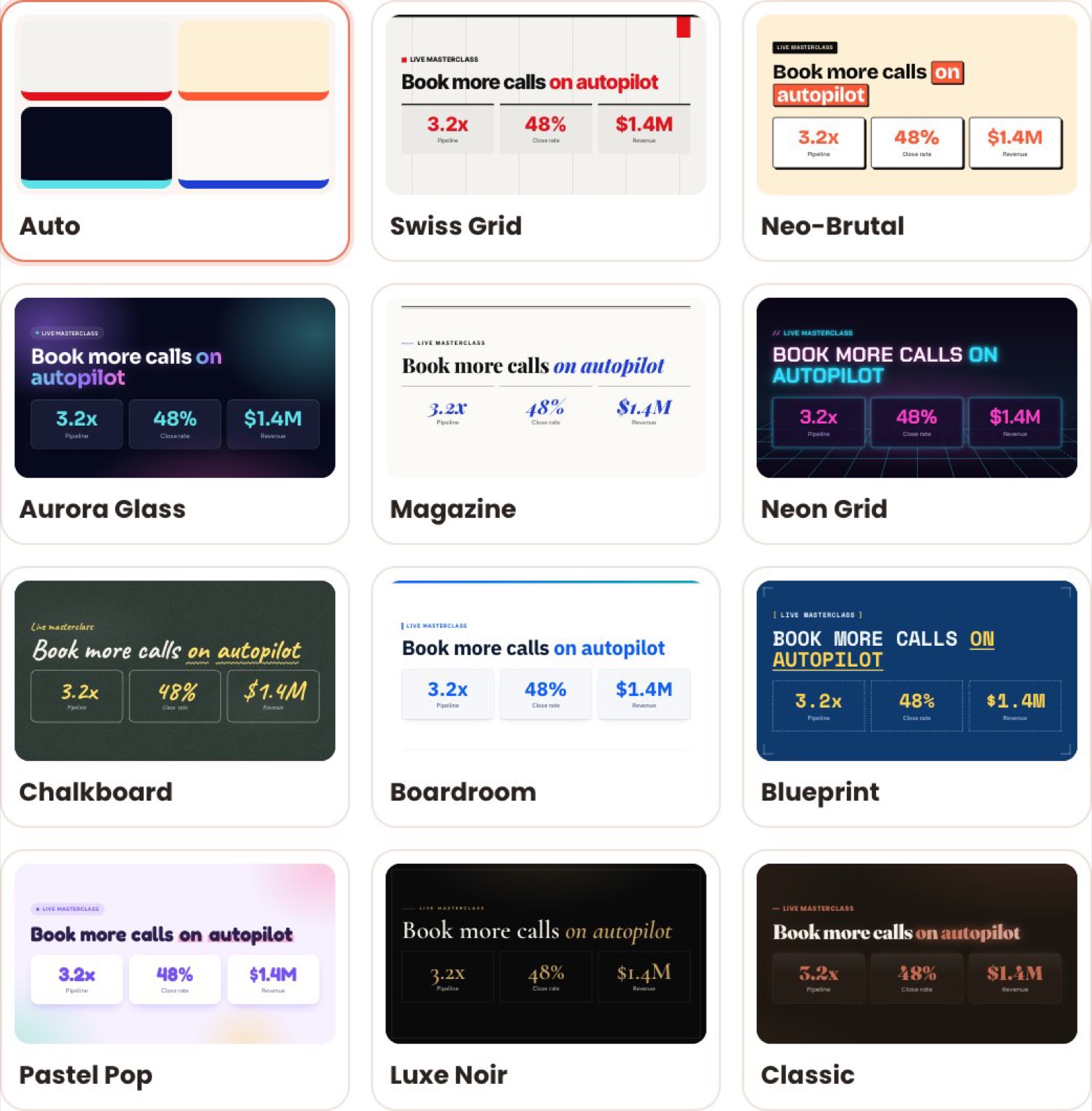
    73 layouts, 11 visual styles, your logo and brand colors

  4. 4 · It voices

    Voiced webinar

    30 natural AI voices in 87 languages

EverPitch product demo

The real product, start to finish. Watch EverPitch create a webinar in 8 minutes.

73slide layouts in 11 styles
30natural AI voices
87languages it speaks
5–60minutes from one prompt
Why a webinar

A webinar gives your offer room to sell.

A social post gets a few seconds. A sales page gets a skim. A webinar gets your viewer's attention long enough to understand what you offer, why it matters and why now. It's your best explanation, delivered the same way every time.

01

Show how it works

Walk viewers through your product or service, step by step, so they can picture using it.

02

Teach something useful

Give real value first. People who learn from you are more open to what you offer next.

03

Build trust and expertise

A clear presentation shows you know your subject, without a single cold call.

04

Explain benefits, answer objections

Cover the price, the fit and the "will this work for me?" doubts before they stop a sale.

05

Present the offer

Make your offer at the right moment and invite viewers to take the next step.

Pip, the EverPitch mascot, sitting alone among empty chairs in front of a paused replay, surrounded by unanswered questions

Replays and sales pages can't answer a single question. Imagine a presentation that explains and promotes your own offer, ready whenever someone is curious enough to watch.

The problem

Why Most Webinars Never Get Made

Plenty of people know a webinar would help their business. Four walls keep getting in the way.

01

The blank script

Writing a structured presentation with a clear opening, useful teaching and a natural transition to your offer can take days.

02

The slide grind

Designing dozens of slides that look polished, without a design background, eats whole weekends.

03

Camera and mic dread

Recording yourself, retaking every stumble, or presenting live to a room that may not show up stops many people cold.

04

Tools and time stacking up

Separate tools for writing, slides, recording, hosting and follow up add cost and learning before your first webinar ever runs.

The shift

EverPitch Takes Down Every Wall

Webinars are no longer only for people with a copywriter, a designer and a studio. If you have an idea and some expertise, you have what it takes.

Created for you

Give EverPitch a topic, a document, a link or a recording. It writes the script, builds the slides and adds the voice.

Customized by you

Change any line, any slide, the tone, the length and your own logo, name and colors. You stay in control.

Presented for you

Your webinar can present on a daily schedule and answer viewer questions out loud, so you don't have to be there.

And It Handles the Marketing Around It for You

Every webinar comes with its own landing page, replay page and a widget for your site, plus a registration link you can share anywhere. Customize them, then send people in.

  • ✓Landing page
  • ✓Replay page
  • ✓Website widget and registration link
Share & embed
Customize your pages
Landing ↗Replay ↗Widget ↗
Registration link
your-registration-link
Embed on your site
<script> … your embed code … </script>
View live ↗Preview widget
A webinar for any pitch, short or long

A short service walkthrough

Explain how you work and invite viewers to book a call or request a quote.

A product or software demo

Show the key features and send viewers to a trial or purchase.

A teaching session

Share one useful framework and grow your list with people who want more.

An offer presentation

Introduce your course, coaching or recommended product with a clear next step.

From Team Todd

We run webinars for our launches.
We know what it takes to get one right.

At Team Todd, we run webinars for all our launch offers. We've created and delivered a lot of them, and we know the work involved goes far beyond pressing "Go live".

A good webinar is eight jobs stacked on top of each other. Each one takes its own skill, and most people quietly give up somewhere between the script and the slides.

  1. Job 1

    Plan the pitch

    Decide the story, the order and where the offer lands.

  2. Job 2

    Write the script

    Draft, read it aloud, notice it drags, rewrite it.

  3. Job 3

    Build the slides

    Dozens of them, each one designed and on brand.

  4. Job 4

    Prepare demos

    Record, trim and cue them at the right moment.

  5. Job 5

    Rehearse

    Run it until the timing and transitions feel natural.

  6. Job 6

    Run the session

    Show up on time, present, watch the chat and make the offer.

  7. Job 7

    Handle Q&A

    Answer clearly, live, without losing the room.

  8. Job 8

    Prepare the replay

    Edit, upload and send it to everyone who missed it.

The truth about webinars

Everyone Knows Webinars Convert. That Is Why People Put Up With The Grind.

A standard sales page gets ten seconds of scanning. A webinar holds someone's undivided focus long enough to build trust, explain the nuance and close the sale. The problem was never whether webinars work. The problem was the two weeks of agony it took to create one.

Pip presenting a rising chart on a flip chart
Pip holding up a stack of finished slides

You shouldn't have to master every job to reap the benefits of a webinar.

EverPitch turns your knowledge and your offer into a complete webinar you can review, customize and share. No scriptwriter, slide designer, voice artist or presenter needed.

See what's inside
Your niche, your offer

What would you promote if creating the webinar were the easy part?

Whatever you know, sell or recommend, there's a webinar that explains it. Here are a few ways people could use EverPitch. They're illustrations, not promises of results.

Coach

Explain your method and invite viewers to book a strategy call.

You'd ask it
A 15-minute webinar on how my coaching works, ending with a free strategy call.

Course creator

Teach a useful lesson and introduce your course.

You'd ask it
A 30-minute lesson on beginner watercolor, then an invitation to my full course.

SaaS business

Demonstrate your software and invite viewers to start a trial.

You'd ask it
A 10-minute demo of our scheduling app, ending with a free trial.

Local business

Explain your service and invite viewers to request a quote.

You'd ask it
An 8-minute walkthrough of how our roof inspections work, ending with a quote request.

Affiliate marketer

Walk viewers through a product and direct them to the offer.

You'd ask it
A 12-minute review of this product's key features, with my link at the end.

And yours?

If you can describe your offer in a sentence, EverPitch can turn it into a webinar.

How it works

From idea to webinar in three steps.

Pip typing a webinar prompt on a laptop
STEP1

1. Tell it what you want to present.

Describe your topic and offer, use the guided setup, or provide existing material such as a document, sales page or recording.

Pip holding up a stack of finished slides while the voice plays
STEP2

2. Let it create the presentation.

EverPitch writes the talk, designs the slides and adds a natural AI voice. Review the result, edit the script and ask for changes to individual slides.

Pip announcing the webinar through a megaphone, with a link, a calendar and an email
STEP3

3. Put your webinar to work.

Choose a registration page, add your offer, set your schedule and share the link or embed the join button.

Your webinar is closer than you think.

Bring the offer. EverPitch writes, designs and voices the presentation.

✓One-time payment✓3,000 credits every month✓30-day money-back guarantee
Watch it create

Script, slides and voice, created and yours to shape.

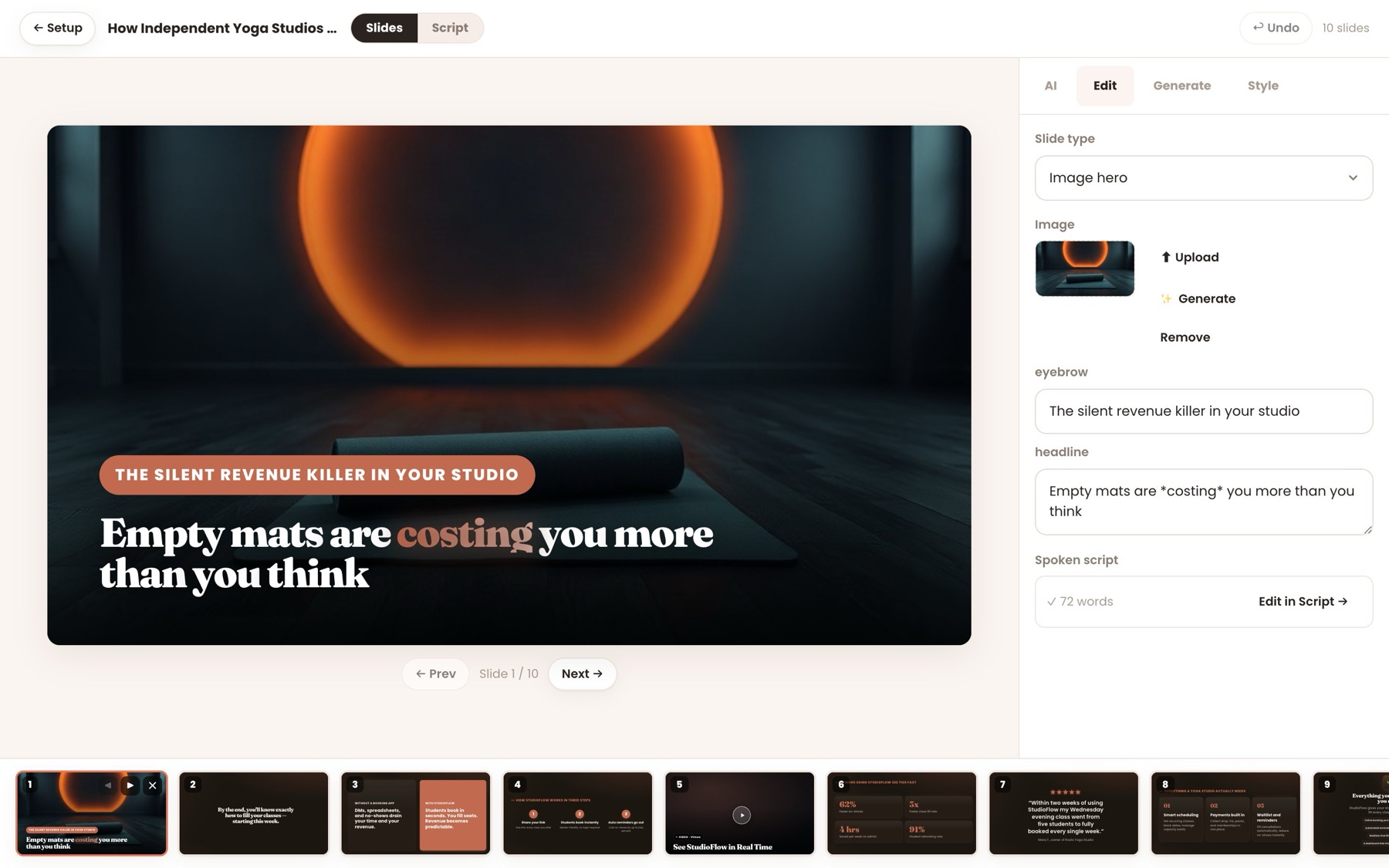
EverPitch gives every point the layout it needs, in one of 11 visual styles, in your brand color, then voices it in one of 30 natural AI voices. These are real screens from the app, not mock-ups.

EverPitch · Slide Studio
The EverPitch Slide Studio editing a generated slide, with the deck along the bottom
Short or long

A webinar doesn't have to be an hour-long event.

EverPitch can create a focused short presentation or a longer teaching webinar. From a prompt, you can create anything from about 5 to 60 minutes, and you can upload a recording of up to 2 GB.

About 5 minutes

A quick explainer

One problem, one solution, one clear next step. Easy to share and easy to finish.

15–20 minutes

A focused sales presentation

Show how it works, handle the main objections and make your offer.

30–60 minutes

A full teaching webinar

Teach something substantial, build real trust and introduce your offer properly.

More ways to create

Start from what you already have, reach more people.

Turn an old recording into a new webinar, create it in other languages, and drop your demo in at the right moment.

01

An old Zoom call becomes an evergreen webinar.

Keep the full video with a live room around it, or cut a tight short version.

Slides are read from the video, so names and prices come out right. Recordings up to 2 GB.

What goes in
MP4launch-webinar-recording.mp4
71 min
→
What comes out
Live room with chat, poll, offer and Q&A
02

One webinar, in every language you sell in.

Translated and re-voiced copies, linked together.

Each visitor gets their own language automatically, and analytics add every version together.

What goes in
English
Your finished webinar
→
What comes out
EnglishEspañolDeutschFrançais日本語Português
Each visitor sees their own
03

Your demo, dropped in at the right moment.

Paste a link. EverPitch finds where it belongs.

The demo plays full-screen with a spoken lead-in, and the talk picks up after. It works on new and finished webinars.

What goes in
youtu.be/your-demo
→
What comes out
Slide 5 · the problem
Slide 6 · how it works
Your demo, with a lead-in
Slide 7 · results
The pages come with it

Everything around your webinar comes with it.

Registration, reminders, your offer, payment connections, the replay page and analytics. Each page is written for your webinar's topic and editable word by word. Payments go to your own account, and leads go to your own list.

  • 31 registration templates, or import the page you have
  • A replay sales page, from 20 templates
  • A join button for any website, in 10 styles
  • Times in each visitor's timezone, plus reminders and calendar invites
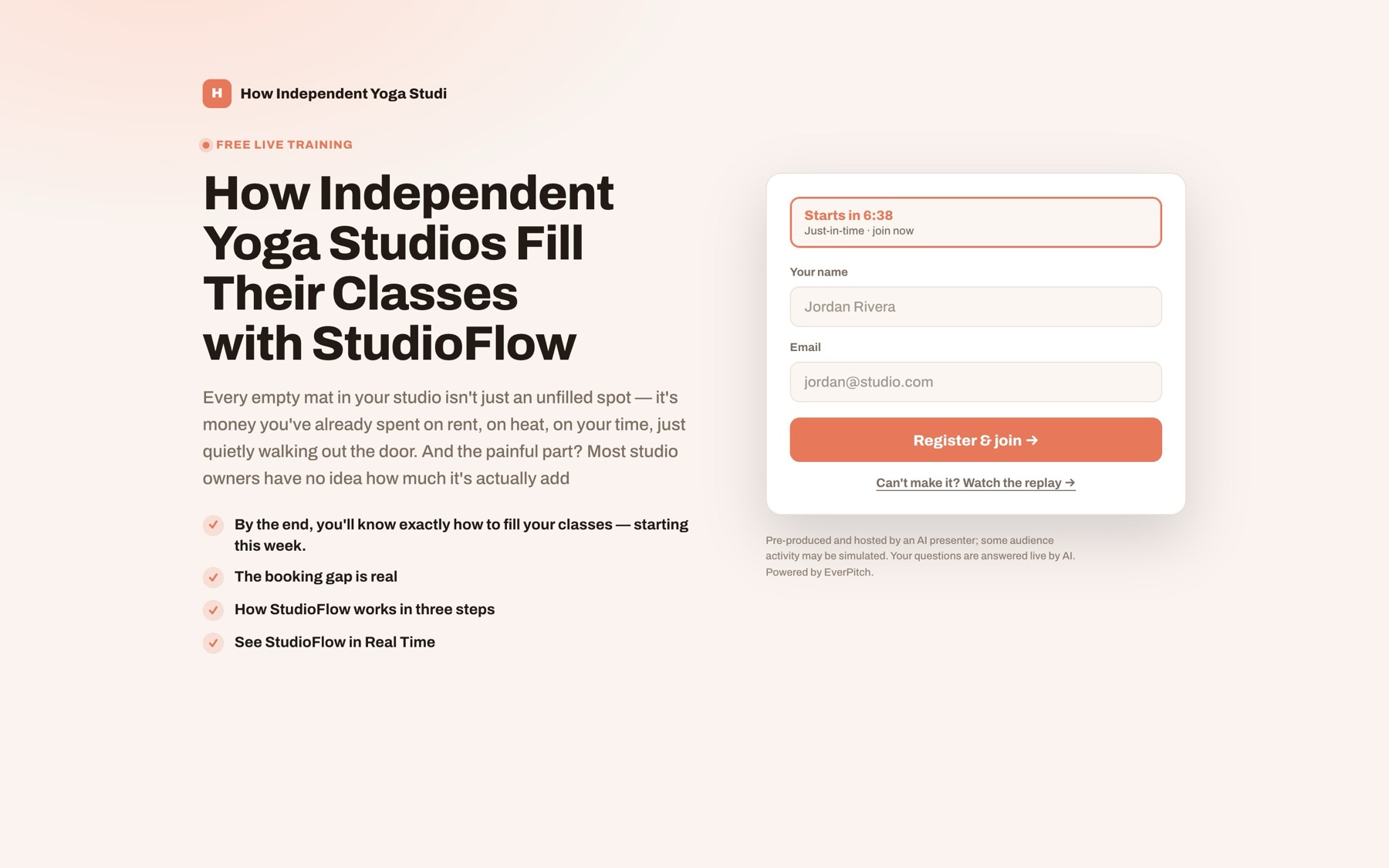
everpitch.co/w/your-webinar
A real EverPitch registration page with a countdown and a sign-up form, written for the webinar's topic
  1. Registration

    A page from 31 templates

  2. Reminders

    Emails and calendar invites

  3. The live room

    One clock, Q&A out loud

  4. Your offer

    On screen at the right moment

  5. Checkout

    Your Stripe, PayPal, Lemon Squeezy or Razorpay

  6. Your list

    With analytics on every step

Sends registrants toMailchimpActiveCampaignKitGoHighLevelGetResponseBrevoAWeberZapier · Make · n8n
After it's created

Then it presents it for you.
And answers out loud.

Once your webinar is ready, EverPitch can run it as an automated evergreen session, every day, in each viewer's timezone. It presents your talk, shows your offer on cue and answers viewers' questions out loud, drawing from your webinar's content. It's evergreen, and it says so.

Try the chat demo
1

The talk

Written, designed and voiced.

One continuous talk, written to be spoken. Slides from 73 layouts in your colors, and a natural voice in 87 languages.

2

The room

Live, on one shared clock.

Everyone sees the same moment. Late joiners land in sync. Polls, your offer and handouts appear right on cue.

3

The host

Answers out loud, by name.

Greets people, sorts the chat and gives spoken answers drawn from your webinar's content, at the moment you choose. Free, up to 20 per session.

Why the name
Ever+Pitch=EverPitch

Your best pitch, given forever: every day, in every timezone, to everyone who registers.

It's evergreen, and it says so. The optional simulated audience is always disclosed.
  • Questions answered at the end, at a minute you pick, or right away
  • Greetings get a welcome. Comments don't interrupt.
  • Answers drawn from what's in your webinar
Try it

Type into the chat. See what the room does.

Pick a message a viewer might send. The room sorts every message first, so the talk only stops for what needs it.

EverPitch product demo
A viewer types…
LIVEChat · How to fill your classes142 watching
Maria hi from Texas 👋
Host Welcome, Maria! Glad you're here.
Greeting

A quick welcome in the chat. The talk keeps going.

An illustration of how the room sorts the chat. In a real session, answers come only from your own webinar.

Why the room matters

Stop sending paid clicks to a silent replay.

Every viewer arrives with a doubt: the price, the fit, whether it works for someone like them. An ad click costs the same whether it lands somewhere that clears that doubt or somewhere that can't.

Destination A

A recorded replay

Plays the same video for everyone. Questions go unanswered.

Questions answeredNone
Destination B

A live webinar

Great when you're there. Only runs when you can show up, in your timezone.

Questions answeredWhen you're live
Destination C

An EverPitch room

Runs on your schedule, in each visitor's timezone, and answers out loud from your content.

Questions answeredUp to 20 per session

EverPitch doesn't supply traffic or run your ads. It gives the visitors you bring a room that talks back.

What you get every month

A month of webinars, already paid for.

EverPitch gives you 3,000 credits every month. A finished minute of webinar costs 40, so that's about 75 minutes. Here are two practical months you could create with them. Built webinars keep running when creation credits run out.

Month A

A new webinar every week

15-minute webinar · week 1
600
15-minute webinar · week 2
600
15-minute webinar · week 3
600
15-minute webinar · week 4
600
15-minute webinar · a test angle
600
3,000 of 3,000FITS
Month B

One big webinar, two languages

30-minute flagship webinar
1,200
The same webinar in Spanish
1,200
A 5-minute short version
200
10 extra AI slide images
150
2,750 of 3,000FITS
✓Questions answered out loud: free, up to 20 per session✓Built webinars keep running when credits run out
Bonuses

Three bonuses, packed with your order.

Made for EverPitch, so your first webinar goes live faster. They're waiting on your thank-you page the moment you check out.

BONUS 1
7 days

The First 7 Days Playbook

One small job a day, from your first login to a live, promoted webinar.

DAY 1Your first prompt
DAY 4Pages, schedule and emails
DAY 7Read the numbers, change one thing
BONUS 2
100 hooks

The Webinar Title & Hook Bank

Fill-in-the-blank webinar titles and opening lines for 10 kinds of business.

COACHHow [type of client] gets [result] without [pain]
SAASThe [number]-minute fix for [problem] in [tool]
BONUS 3
7 emails

The After-Webinar Email Pack

Ready-to-edit follow-ups for people who stayed, left early, missed it, or still have a question.

NO-SHOW"Here's the replay, {{name}}"
LEFT EARLY"You missed the best part"

Choose how you want to get started.

Start with EverPitch Commercial, or explore the Bundle for more monthly creation credits and everything included in the package.

Core Software

EverPitch Commercial

Create and run your own webinars with the core EverPitch tools.

$37.25one time
  • AI-created webinar scripts, slides and voice
  • Automated evergreen webinar sessions
  • Spoken Q&A, up to 20 answers per session
  • Registration pages, reminders and replay pages
  • 3,000 credits every month
  • Commercial license
  • Three included bonuses
EverPitch Commercial

One-time payment · Instant access · 30-day money-back guarantee

More Creation Capacity

EverPitch Bundle

Get everything in Commercial, plus the Bundle's additional content and capabilities—with more than 2.5× the monthly creation credits.

$197.25one time
  • Everything in Commercial
  • 8,000 credits every month
  • Over 2.5× the monthly creation credits
  • Additional content and capabilities included in the Bundle
See Everything in the Bundle →

See what's included and decide which option fits you.

Pip holding a shield with a check mark
30days
Money-back guarantee

Use it for 30 days. Then decide.

Create your first webinar, review it, customize it and put it to work. If EverPitch isn't right for you, email support within 30 days of buying and you'll get your money back through JVZoo.

No reason neededTell us why if you like. You don't have to.
A full 30 daysTo try every part of it.
Back the way you paidRefunded through JVZoo.
Questions

Questions people ask.

Getting started
Do I need to be technical?

No. You describe your offer in plain words, or upload something you already have. EverPitch creates the webinar and you review it before it goes live. There's nothing to install.

How do I get my login?

Right after checkout you'll get an email titled "Set up your EverPitch account". Click the link, choose a password, and you're in.

Do I have to appear on camera or record my voice?

No. EverPitch writes, designs and voices the whole webinar. No camera or microphone required.

How long can a webinar be?

From about 5 minutes up to 60 minutes when you start from a prompt. Recordings can be up to 2 GB.

Credits and price
Is this really a one-time payment?

Yes. EverPitch Commercial is one payment of $37.25 with no monthly subscription, and it includes 3,000 credits every month.

What are credits?

Credits pay for building webinars: 40 per finished minute. A 15-minute webinar uses about 600. Extra languages and extra AI images use a few more.

What if I run out?

Webinars you've already built keep running when creation credits run out. New builds wait until your credits refresh next month.

Do questions during a session cost credits?

No. Answering questions out loud is included, up to 20 answers per session.

Your business
Is it really live?

The talk is prepared ahead of time and played on a shared clock, so everyone in a session sees the same moment. Questions are answered out loud, drawing from your webinar's content, up to 20 spoken answers per session. The simulated audience is optional, and when it's on, your registration page says so.

What if it gets a fact wrong?

Answers come only from what's in your webinar, and you can read and edit every line of the script before you go live. Spam and abuse in the chat are screened before anything is read out.

Who helps me if I'm stuck?
Your offer deserves a webinar

Your expertise, presented
every single day.

Pip relaxing in a beach chair while the finished webinar runs on a laptop
Path one

Keep putting it off

The script, the slides and the recording stay on your someday list, and your offer keeps waiting for its presentation.

OR
Path two

Have it created for you

Bring your offer. EverPitch creates the script, slides and voice, then presents it and answers questions out loud. One payment, and 30 days to decide.

Create my first webinar
✓One-time payment✓30-day guarantee✓Instant access

P.S. Worried it won't sound like you? It writes from your own words, documents or recording, and you can edit every line before it goes live.

P.P.S. Never used a tool like this? Start with "Prompt to webinar" and the First 7 Days Playbook. One small job a day.